
1. Architecture and tenancy
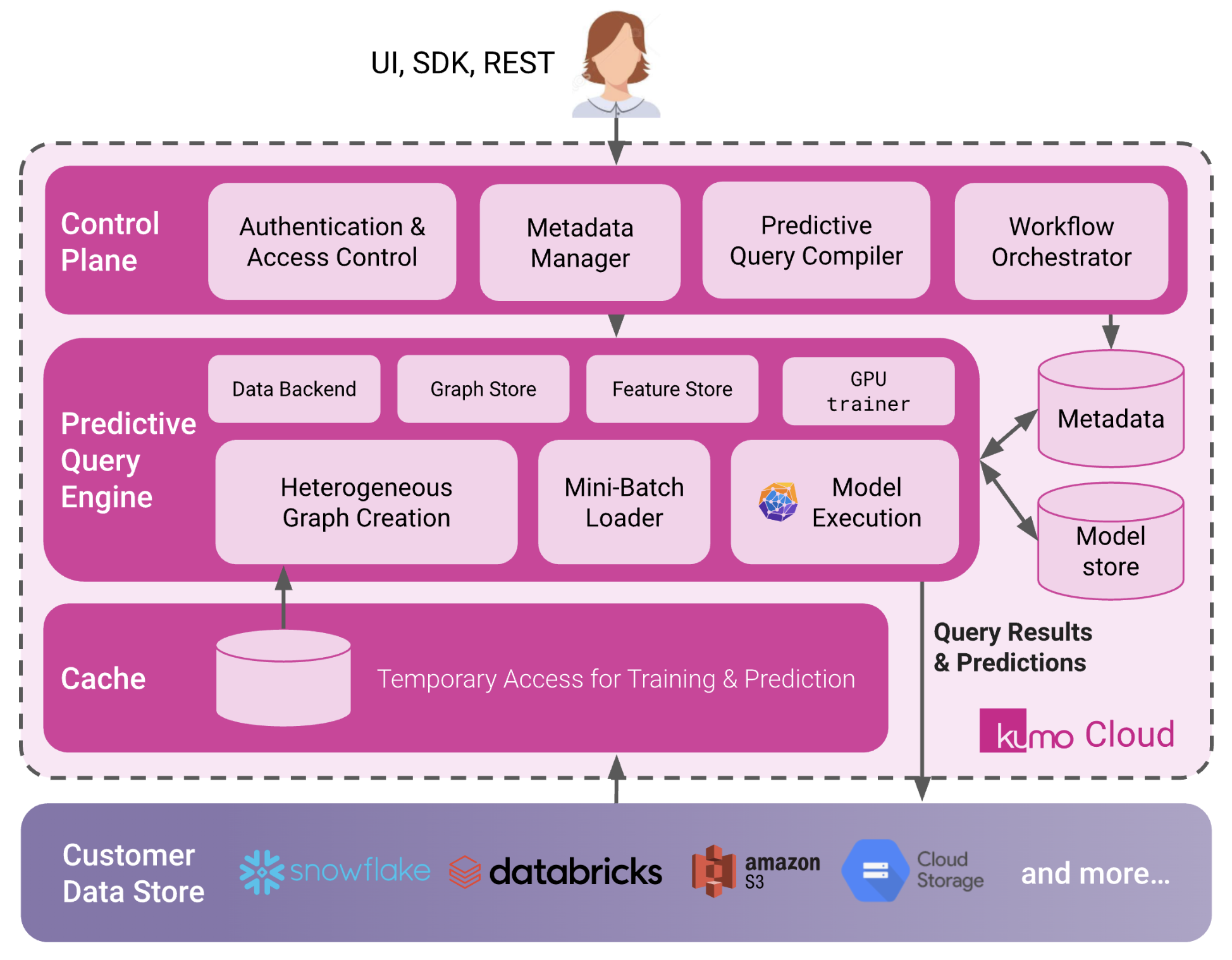
Each customer receives a dedicated Kumo tenant:- A unique tenant URL for the web console and APIs.
- A logically isolated application environment (compute, storage, and control plane) managed by Kumo.
- A set of static Kumo egress IPs that you can allowlist in firewalls or VPC endpoints.
2. Identity and console access
Access to the Kumo console and APIs is integrated with your identity provider:- SSO via SAML or OIDC is required for console access; passwords are not managed by Kumo.
- MFA, device posture checks, and other policies are enforced by your IdP.
- Optionally, you can enable SCIM or just-in-time provisioning so users can be managed centrally and onboarded automatically from groups in your IdP.
3. Data flow and protection
The core design principle is that your primary data stays in your data platforms, and Kumo uses a connector model with least-privilege service accounts:- Kumo connects to warehouses and lakes (Snowflake, BigQuery, Databricks, S3, and others) using a service account that you create and control.
- The connector guides (Snowflake, Google BigQuery, AWS S3, Databricks, SPCS Snowflake Connector) specify the exact permissions and roles required.
- Kumo reads the data needed for training and scoring via these connectors, processes it in your dedicated Kumo tenant, and writes results back to destinations that you configure (for example, prediction tables in the warehouse or objects in S3).
-
Data residency & persistence
- For warehouse-based connectors, data is read on demand, processed, and written back to your destinations.
- The only path that can persist data inside Kumo is direct file upload; this can be disabled entirely if your policies require that all data originate in your own platforms.
-
Security of data and secrets
- All data in transit between Kumo and your systems is protected with TLS.
- Secrets (connector credentials, keys) and model artifacts are encrypted at rest in your Kumo tenant.
- Only the service account you designate is used to access your data systems; credentials can be rotated at any time via the REST API or through an administrative UI flow.
-
Co-building with Kumo data scientists
During evaluations and early projects, many customers temporarily create least-privilege user accounts for a Kumo data scientist in Snowflake/BigQuery/Databricks so they can co-build models directly in your environment. This is optional, controlled by you, and typically removed once onboarding is complete.
4. Installation and onboarding flow
A typical SaaS onboarding looks like this:-
Provisioning
Kumo provisions your single-tenant environment and shares:- Your tenant URL
- The Kumo egress IPs to allowlist
-
Network & identity
You allowlist the Kumo egress IPs on your side (firewalls, private endpoints, etc.), then configure SSO via Configuring SSO and optionally SCIM/JIT provisioning. -
Connector setup
You follow the relevant connector guide(s) to:- Create a least-privilege service account in your data platform
- Grant only the required roles/permissions
- Register credentials and connection details in Kumo
-
Smoke test
Together, we run a simple ingestion → training → scoring workflow so your team can see the full path from source data to predictions working end-to-end.
5. Working with Kumo in practice
Most teams start with the Kumo web UI:- Configure connectors, define prediction problems, review model diagnostics, and monitor jobs through guided flows.
- Use the UI to understand how data is being joined and transformed before training.
- The REST API and Python SDK are used to automate training and scoring from CI/CD pipelines, orchestration tools (e.g., Airflow), or scheduled jobs.
- Quotas and Limits describe the default concurrency, job limits, and sizing expectations so you can plan capacity and integrate Kumo into your existing workflows.