
Overview
TheExplanations tab on Training job detail page provides model-level explainability and insights into individual entity-level predictions for a selected subset of entities.
Explaining How Predictive Queries Work
While sophisticated algorithms have demonstrated remarkable performance in various prediction tasks, their inherent opacity poses challenges in understanding why a particular decision was made. Explainable AI (XAI) aims to shed light on the “black box” nature of machine learning models, making their reasoning more transparent and interpretable. Kumo leverages advanced graph neural networks (GNNs) to make predictions, but you don’t have to worry about them being a black box. Kumo’s platform provides several XAI mechanisms for explaining why a particular prediction was made, as well as detecting potential issues like data leakage, bias, and model performance degradation. With these XAI tools, you can more confidently trust your predictions, effectively spot data quality issues, and troubleshoot issues with your predictive queries. Kumo’s XAI metrics can help you make sense of how the tables in your graph, the columns within those tables, and the range of values in each of those columns contribute to how your predictive query behaves. These state-of-the-art XAI tools enable you to understand and explain to stakeholders—down to the level of individual values in each column of the tables in your graph—exactly how your predictive query makes its predictions.Entity-Level Explainability
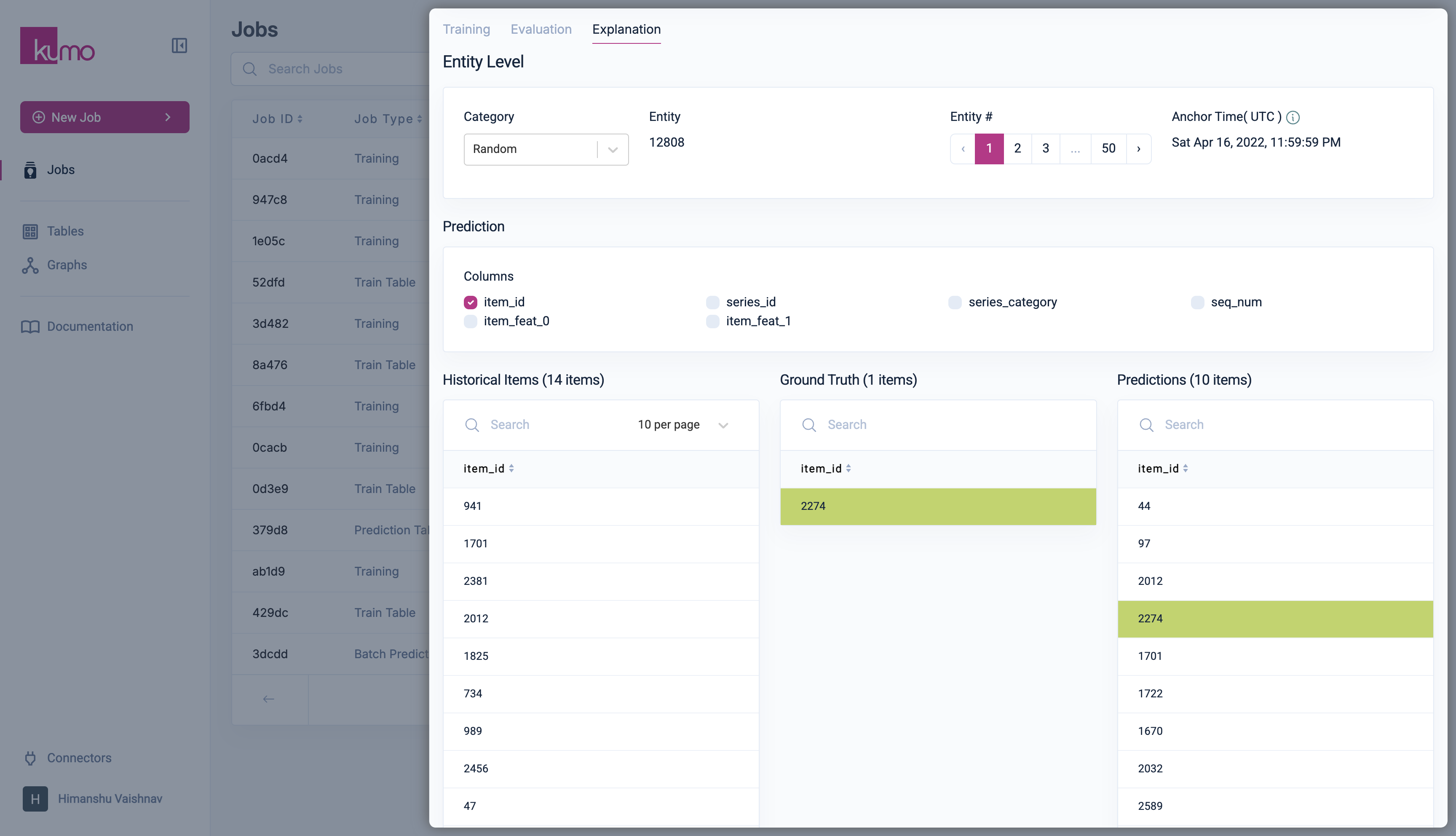
This includes:- Entity-level Explainability to explore model predictions and compare them against ground-truth data. For example, a predictive query that involves a link prediction task will display a list of selectable entity categories for viewing and comparing predictions against historical and ground truth data in a three-way pane.
- Subgraph Visualization shows the full subgraph that is used inside the model to derive a prediction. This can be tremendously useful for debugging purposes (e.g, to see whether the model sees the expected inputs).
- Column Importance Scores lets you observe column importance scores for individual nodes in the surrounding of an entity (e.g., importance scores of transaction dates, article categories, etc.). Column importance scores are generated through backpropagation of gradients with regards to input columns. The higher the score, the more important this particular row/column pair is for your prediction.
- Pre-selected Entities based on a set of different criteria (e.g., true positives, true negatives, false positives, false negatives, cold start entities, etc.). This allows you easily explore a diverse and rich set of entities, across a wide range of different model predictions.
Entity Selection
Entities are grouped into categories based on model confidence and correctness (e.g., true positives, false negatives, uncertain predictions, cold-start entities). Each category allows exploration of up to 50 entities, along with their anchor time.Model Prediction Analysis
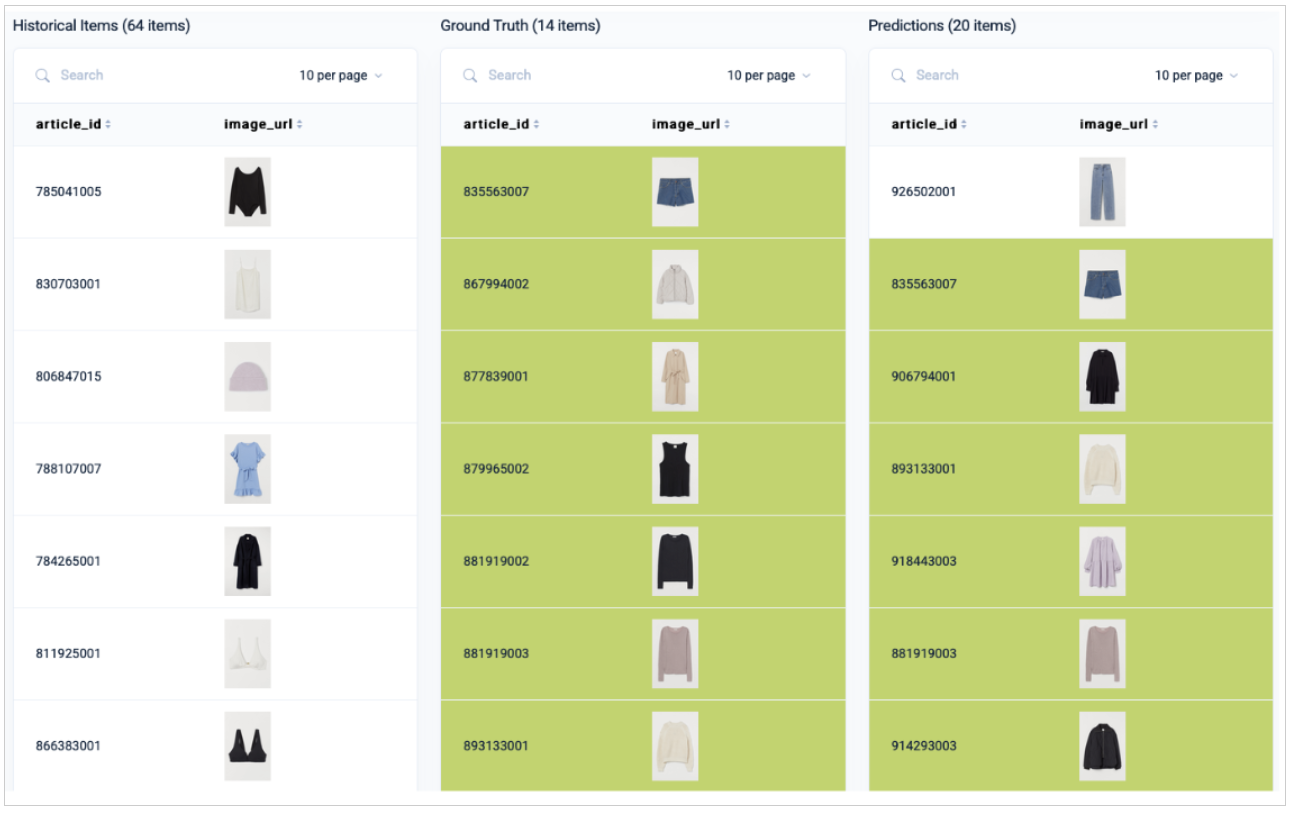
For a selected entity, Kumo displays its model prediction and ground-truth value. In link prediction tasks, predictions are shown in three searchable panes:- Historical Items
- Ground Truth
- Predictions
Subgraph
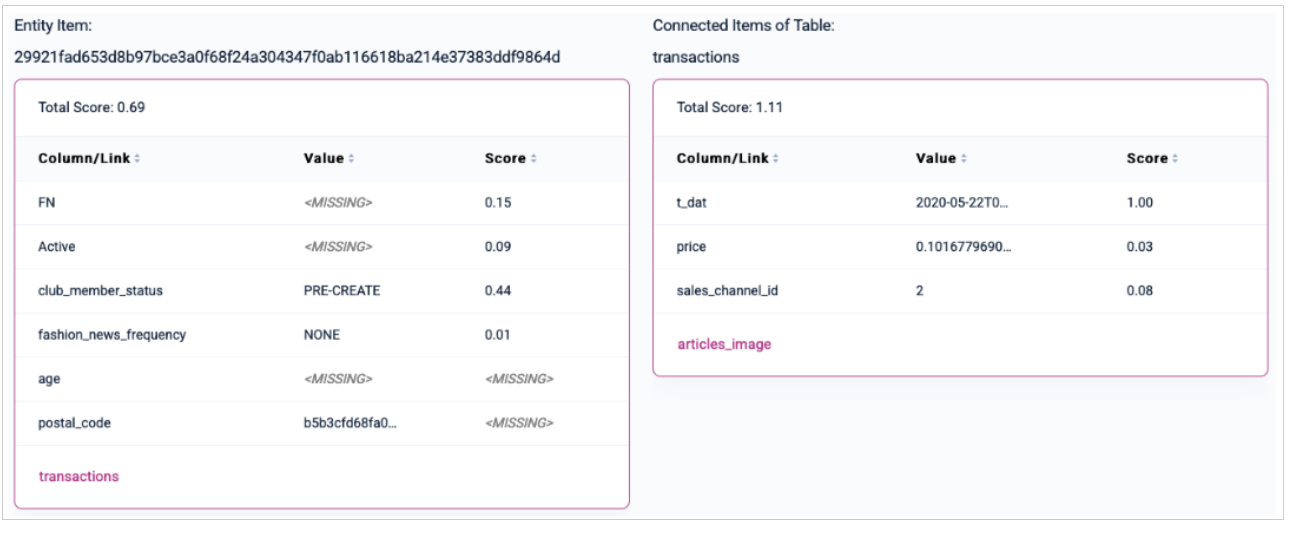
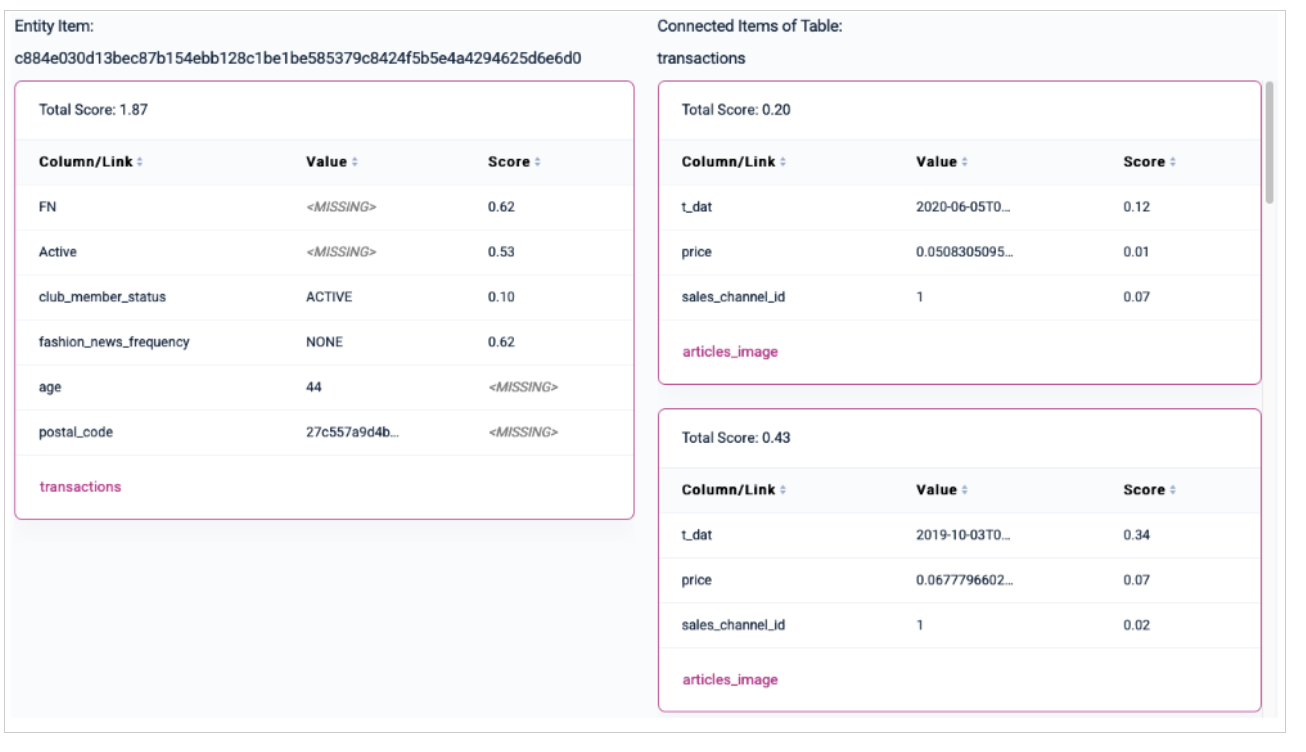
The subgraph explorer allows you to inspect the subgraph that was used as input to the model in order to make a prediction. This feature is highly useful for debugging purposes (e.g, to see whether the model sees the expected inputs). Starting from the entity’s input row, the subgraph is visualized in a nested table layout that allows you to explore information it receives from different tables, following the respective foreign keys that point to this particular table. The traversal depth for connected items depends on the number of layers set in the model planner. Connected fact items are ordered by recency. If you cannot find a particular table here that you would expect to see, the table most likely unreachable within the given upper bound defined in the model planner. The importance score not only helps you detect potential target leakage in your data, but also provides insights into your data and why a certain model prediction may be correct or wrong.Local Subgraph Explainability
Local subgraph explainability is prediction-specific. For a given entity, Kumo looks at the sampled neighborhood used to make that prediction, including related rows, neighboring entities, timestamps, and feature values. The local attribution scores are gradient-based. At a high level, the calculation works like this:- Kumo runs the model on the sampled local subgraph for the entity.
- It selects the model output being explained, such as the positive-class score or logit for a binary classifier.
- It computes gradients of that output with respect to the encoded input features in the local subgraph.
- Those gradients are mapped back to the corresponding feature values and facts in the sampled subgraph.
- The resulting scores are normalized so they can be compared within that local explanation.
PQL
active or club_member_status, and it does not receive fashion news. In addition, this user only has a single transaction in the past.
active status and does not receive fashion news, but has an active club member status. The user also has several past transactions, taking place in 6-7 month intervals. Considering these contradictory signals, the model signals that it is unsure about whether this particular user will churn or not, with a small tendency to churn:
Global Explainability
Global Feature Importance
Global feature importance explains which features matter most across a population of predictions. For binary classification models, the value being analyzed is the model’s predicted probability for the positive class. At a high level, the calculation works like this:- For each feature, Kumo groups examples into cohorts based on the feature’s values, such as bins for numerical features or categories for categorical features.
- For each cohort, Kumo computes the average predicted positive-class probability.
- Kumo measures how much those cohort-level average predictions vary across the feature’s cohorts.
- Those raw feature-level variation scores are normalized across features so the displayed Global XAI percentages add up to 100%.
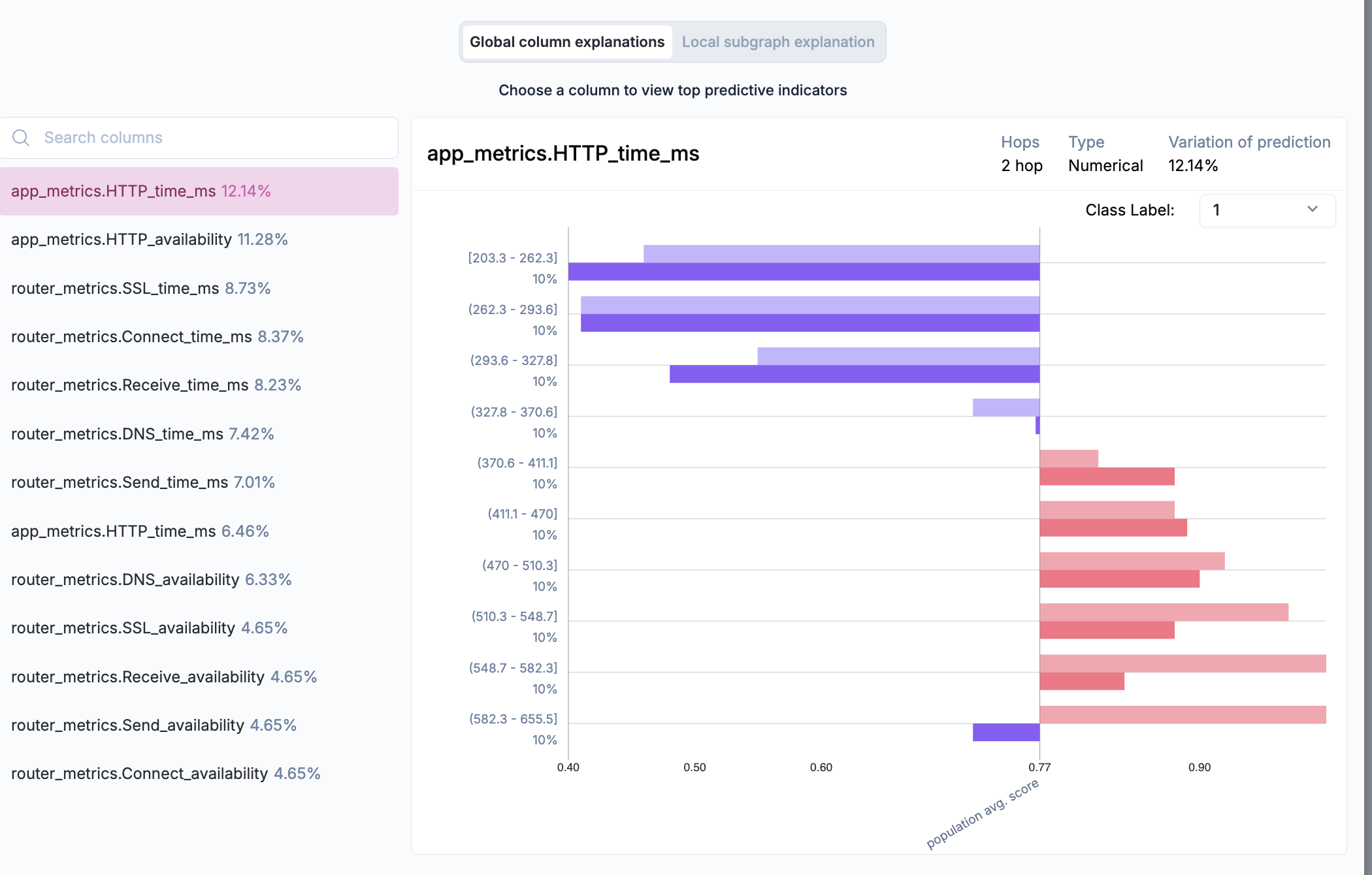
Variation of Predictions column indicate how each respective column contributes to your end predictions, calculated based on the variance of these predictions relative to the underlying columns (i.e., based on both ground truth labels and predictions).
Detecting Data Leakage
Columns with variation of prediction values dramatically higher than any others may be symptoms of data leakage, a common cause of poor accuracy at prediction time. Data leakage occurs during training when the model has access to information directly correlated to the target value being predicted, but not actually known yet at the time of prediction. For example, if you are predicting whether a customer will churn in the next 30 days and you have a column indicating whether the customer will cancel their subscription in the next 30 days, this would constitute both target leakage and future information leakage; in this case, you would look for an excessively high contribution score for this column.Column Analysis
Clicking a column provides a distribution plot comparing model predictions and actual labels in the holdout data split. This helps identify:- Bias in model predictions across different entity populations.
- Feature Importance and its effect on prediction outcomes.
- Potential Data Gaps requiring additional feature engineering or dataset improvements.